

Matching hoodie couple AI photo prompt for Gemini and ChatGPT. Upload one couple photo or two separate selfies, paste this prompt, and get a cozy winter portrait that keeps both faces exactly the same. Works with Gemini and ChatGPT. The example image below is AI-generated.
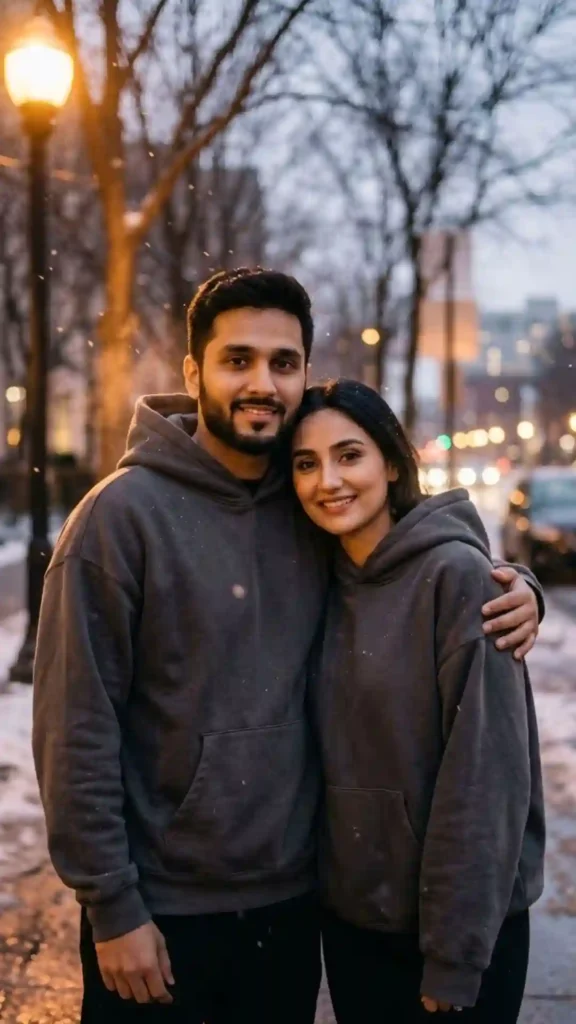
==ased on the uploaded photo(s), create a realistic winter evening portrait of a young couple standing side by side on a street at dusk. Both wear matching oversized charcoal-grey hoodies with no logos, text, or brand names. The man has his arm around the woman’s shoulder; she leans into him with a soft smile. Warm amber streetlight from the left creates a golden glow on their faces and hoodies. Faint snowflakes in the air. Shot with a 50mm lens at f/2, shallow depth of field, creamy bokeh background of soft city lights and bare winter trees. Color palette: charcoal grey, warm amber, soft white. Mood: cozy, intimate, winter evening. 9:16 vertical ratio. No extra fingers, no distorted hands, no watermark, no text on clothing.==
Works best with: Gemini, ChatGPT
Upload your photo first, then paste this prompt.
How to Use This Matching Hoodie Prompt
With One Couple Photo
Upload a clear photo of both of you together. The AI sees two faces and keeps both. In the prompt, say “the person on the left” and “the person on the right” so the AI knows who is who. This works best when both faces are clearly visible and well-lit.
With Two Separate Selfies
Upload two photos, one for each person. In the prompt, describe each person by name or role: “The first uploaded photo is the man. The second is the woman.” Then describe their outfits and positions separately. This gives the AI clearer instructions for each face.
Tip: For best results, use photos with similar lighting and angle. If one photo is dark and the other is bright, the AI may struggle to blend them naturally.
Hoodie Color Combos
Pick a color and add the phrase to your prompt. These are the most popular matching hoodie colors for couples:
“matching oversized charcoal-grey hoodies, warm amber streetlight”
“matching burgundy hoodies, golden hour light, soft shadows”
“matching navy blue hoodies, blue hour light, cool tones”
“matching cream hoodies, soft daylight, warm indoor light”
“matching black hoodies, dramatic shadows, moody light”
“matching pastel pink hoodies, soft pink light, gentle mood”
Pose Ideas for Matching Hoodie Couples
Each pose below includes the exact phrase to add to your prompt. Pick one and paste it in:
“standing side by side, his arm around her shoulder, she leans into him with a soft smile”
“standing close, foreheads touching, both smiling with eyes closed, intimate and warm”
“standing back to back, looking in opposite directions, relaxed and confident”
“walking hand in hand down a winter street, looking at each other and laughing”
“sitting side by side on a bench, his arm behind her, both looking at the camera with soft smiles”
Setting and Mood Swaps
Swap the setting in your prompt to change the mood. Each chip below includes the phrase to use:
Fix Face Drift and Hoodie Mismatch
One face looks different or wrong
Add to your prompt: “Lock both faces to the uploaded photos. The person on the left is [name/role]. The person on the right is [name/role]. Preserve each person’s exact facial structure, skin tone, and features. Do not swap or merge faces.”
Hoodies don’t match in color or style
Add: “Both hoodies are the same color, same style, same fabric. Matching oversized hoodies with no logos, no text, no brand names.” If the AI still makes them different, add “identical hoodies, same shade, same fit.”
Extra fingers or distorted hands
Add: “Correct number of fingers on both hands. Natural hand positions. No extra limbs.” If hands are hidden in pockets, specify “hands in pockets, no visible fingers.”
Plastic or smoothed skin
Add: “Natural skin texture, visible pores, no skin smoothing, no beauty filter. Realistic skin with natural imperfections.”
Wrong aspect ratio
Make sure “9:16 vertical ratio” is at the very end of the prompt. Some AI tools need the ratio stated explicitly. If using ChatGPT, you can also add “vertical portrait orientation.”
Build Your Own Version of Matching Hoodie Couple AI Photo Prompt
Use this formula to create your own matching hoodie couple prompt. Swap each part:
- Face lock: “Use the uploaded photo(s) as the only identity reference. Lock both faces exactly as they are.”
- Hoodie: “Matching oversized [color] hoodies, no logos, no text, no brand names.”
- Pose: “Standing side by side, his arm around her shoulder, she leans into him.”
- Setting: “Winter evening street, warm amber streetlight, faint snowflakes.”
- Light: “Warm amber light from the left, golden glow on faces.”
- Lens: “50mm lens at f/2, shallow depth of field, creamy bokeh.”
- Negatives: “No extra fingers, no distorted hands, no watermark, no text on clothing.”
- Ratio: “9:16 vertical ratio.”
FAQs
Does this work with one photo or two separate photos?
Both. With one couple photo, the AI sees both faces clearly. With two separate selfies, describe who is who in the prompt. Two separate photos give the AI clearer instructions for each face, especially if the photos have different lighting.
How do I tell the AI which person is which?
Say “The person on the left is [name/role]. The person on the right is [name/role].” Or “The first uploaded photo is the man. The second is the woman.” Then describe each person’s outfit and position separately. This prevents face swapping.
Can I change the hoodie color?
Yes. Replace “charcoal-grey” with any color: burgundy, navy blue, cream, black, pastel pink, olive green. Keep “matching” and “no logos, no text” in the prompt. The color swatch grid above has copy-paste phrases for six popular colors.
Why do the faces look different in the result?
Two-face prompts are harder for AI. Use clear, well-lit photos of both people. Add “Lock both faces to the uploaded photos” at the start. Describe each person’s position and outfit separately. If one face drifts, add “preserve exact facial structure, no beautifying” for that person.
Is this for Instagram?
Yes. The 9:16 vertical format works for Instagram Reels, Stories, and posts. Matching hoodie couple photos are popular for couple accounts, anniversary posts, and winter content.
Gemini or ChatGPT?
Both work. Gemini (Nano Banana) handles two-face prompts well and keeps facial detail. ChatGPT is good at complex scenes with multiple people. Try both and compare results.
How to get better quality?
Use high-resolution photos with good lighting for both people. Add “8K, photorealistic, DSLR quality” to the prompt. Generate 2-3 versions. Match the lighting in both reference photos for more natural blending.
More Trending AI Photo Prompts
- Hoodie Photo Prompt for Boys — 5 real streetwear looks
- Rain Prompts — moody, cinematic AI photos
- Instagram AI Photo Prompt — 5 real-looking ideas
- Cinematic Prompts — film-still AI photos
By Jason | Last updated: November 2026

Jason is an experienced content writer with four years of expertise crafting engaging blogs on AI prompts. Having previously written impactful articles for Prompt Ky, he is currently bringing his specialized knowledge and skills to Promptzify.com.
2 thoughts on “Matching Hoodie Couple AI Photo Prompt”